
Error 132, what do :(

User avatar
kurasiaa
Journeyman Hunter
Journeyman Hunter
Posts: 177
Joined: Sun Jul 24, 2011 11:42 am
Realm: Dath'remar
Gender: female

Error 132, what do :(

Unread post by kurasiaa »

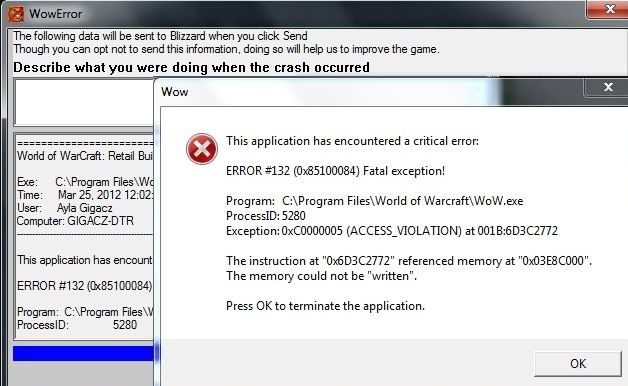
So last night I ran into the error known as ' the dreaded 132', never had it before and I'm not exactly good with computers so I'm not sure what has caused it D:. Ever since it happened, I have been unable to log in to any characters. I can launch the game, log in, view my character screen, but when the loading screen for a selected character reaches 100% the error happens again =(.
It first happened when I zoned into Zul gurub, I had only been online for roughly 5-10 minutes max. The game crashed and came up with this.. Image
So far..
I have Deleted the cache, WTF and interface folders ( so all AddOns are gone too.)
I have attempted renaming some of them using my guildies instructions.
I Have ran the WoW repair tool, without it finding any problems.
I Ran a RAM test overnight last night , for 8 hours and it did not find any problems.
Re-installed WoW.

Not sure what else to do, if anyone has suggestions that would be great =).
Image
User avatar
Lisaara
Illustrious Master Hunter
Posts: 17426
Joined: Thu Sep 09, 2010 9:11 pm
Realm: Moon Guard
Gender: Genderfluid
Location: US
Contact:

Re: Error 132, what do :(

Unread post by Lisaara »

I hope this helps. Google tends to come in handy for these situations.

The 132 error basically means your computer is having trouble reading and saving the Temporary Files required to run the game.

WoW Error 132 and How To Fix It

It's basically gonna tell you 4 ways to usually fix the problem.

1. Clean our the Temporary Files folder
2. Update your Video Drivers (this helped me when it used to happen a crapton to me)
3. Reinstall WoW
4. Clean your Registry

Since you said you did 1 and 3 already....I'm gonna guess 2 will be the one that will most likely help you. Often you forget to update the video and audio cards.

Image
Lisaara ღ Pokefarm
Sig Credits: Lisaara, Ashaine

User avatar
kurasiaa
Journeyman Hunter
Journeyman Hunter
Posts: 177
Joined: Sun Jul 24, 2011 11:42 am
Realm: Dath'remar
Gender: female

Re: Error 132, what do :(

Unread post by kurasiaa »

Thanks (: the issue seems to be resolved now, it turns out I was actually missing one minor step in the first step ( cleaning the folders) ..how stupid hehe, but yeah basically when it comes to computer problems my brain = a peanut =P.
What I was doing last night, was removing the cache, interface and WTF folder and then using the repair tool. The tool would then tell me ' No problems found'
It turns out what I should have done was was remove the cache, interface and WTF folder, then restart the computer! and then use the repair tool. So yeah I missed out the restarting part * facepalm* After restarting the repair tool said ' World of Warcraft successfully repaired.'
WoW is running smoothly so far, so if it works fine with no crashes for tonights raid, then I'll guess that it's all safe =).

I did quite a bit of searching on Google, but people always talk in smarty talk haha =P.
Image
User avatar
Lisaara
Illustrious Master Hunter
Posts: 17426
Joined: Thu Sep 09, 2010 9:11 pm
Realm: Moon Guard
Gender: Genderfluid
Location: US
Contact:

Re: Error 132, what do :(

Unread post by Lisaara »

Well I'm glad to be of service. ^.^ And I'm glad that site wasn't talking in technical terms. Some don't realize you gotta speak more simple for others to understand. Not everyone is a computer wiz(and I seriously don't mean anything offensive by this) and knows all the geeky technical terms. Heck even I don't know them all.

Image
Lisaara ღ Pokefarm
Sig Credits: Lisaara, Ashaine

User avatar
kurasiaa
Journeyman Hunter
Journeyman Hunter
Posts: 177
Joined: Sun Jul 24, 2011 11:42 am
Realm: Dath'remar
Gender: female

Re: Error 132, what do :(

Unread post by kurasiaa »

Hehe yeah :3
Image
User avatar
Lisaara
Illustrious Master Hunter
Posts: 17426
Joined: Thu Sep 09, 2010 9:11 pm
Realm: Moon Guard
Gender: Genderfluid
Location: US
Contact:

Re: Error 132, what do :(

Unread post by Lisaara »

Lets hope that keeps your problem at bay though I still recommend checking your video and audio drivers so they're up to date anyway.

Image
Lisaara ღ Pokefarm
Sig Credits: Lisaara, Ashaine

User avatar
kurasiaa
Journeyman Hunter
Journeyman Hunter
Posts: 177
Joined: Sun Jul 24, 2011 11:42 am
Realm: Dath'remar
Gender: female

Re: Error 132, what do :(

Unread post by kurasiaa »

Yeah, WoW managed to survive the rest of the night through the raid with no problems (: So it's good for the time being, and yeah I probably should check that out too ^_^.
Image
User avatar
Lisaara
Illustrious Master Hunter
Posts: 17426
Joined: Thu Sep 09, 2010 9:11 pm
Realm: Moon Guard
Gender: Genderfluid
Location: US
Contact:

Re: Error 132, what do :(

Unread post by Lisaara »

Awesome! Glad to hear it. :3

Image
Lisaara ღ Pokefarm
Sig Credits: Lisaara, Ashaine

Post Reply