Page 1 of 1
How do you get your pictures in your posts?
Posted: Thu Jan 28, 2010 2:18 pm
by Lonejacobs
How do you get your pictures in your posts like i have seen others with. the animated character ones.

Re: pictures in posts
Posted: Thu Jan 28, 2010 2:22 pm
by Saturo
Put the addres inside the img
Re: pictures in posts
Posted: Thu Jan 28, 2010 2:24 pm
by Lonejacobs
i mean where do they get them from ?
Re: pictures in posts
Posted: Thu Jan 28, 2010 2:26 pm
by Mania
Basically, you put in the URL of the picture and then use the BBCode

Re: pictures in posts
Posted: Thu Jan 28, 2010 2:26 pm
by Saturo
You mean the signatures? Go to USer Control Panel, it's at the top of the site.
Profile > Edit Signature
Then just add the (img) address (/img) in the window, like a normal post.
Re: pictures in posts
Posted: Thu Jan 28, 2010 2:28 pm
by Mania
Lonejacobs wrote:i mean where do they get them from ?
You can make your own, or ask one of our dedicated forum helpers to make one for you in these threads:
http://forums.wow-petopia.com/viewtopic.php?f=7&t=215
http://forums.wow-petopia.com/viewtopic.php?f=7&t=118
Re: pictures in posts
Posted: Thu Jan 28, 2010 2:49 pm
by Lonejacobs
ok im still confused and cant make an image. any more help would be appreciated.
Re: How do you get your pictures in your posts?
Posted: Thu Jan 28, 2010 2:52 pm
by Vephriel
Well, from what I can see in your signature right now you're trying to link something from the WoW Armory? That's not going to work....what sort of picture are you wanting as your siggy?
Re: How do you get your pictures in your posts?
Posted: Thu Jan 28, 2010 2:56 pm
by Mania
The problem with the signature you have now:
Code: Select all
[img]<iframe%20src="http://www.wowarmory.com/character-model-embed.xml?r=Draka&cn=Lonejacobs&rhtml=true"%20scrolling="no"%20height="588"%20width="321"%20frameborder="0"></iframe>[/img]
Is that the URL you have does complicated stuff that the forum doesn't know how to interpret. Instead, let's try taking a screenshot of that and uploading it, like so:
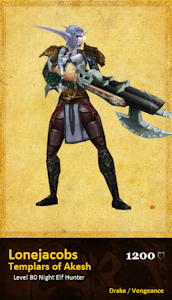
You can add that to your signature with the code:
Code: Select all
[img]http://forums.wow-petopia.com/download/file.php?mode=view&id=203&sid=7b2fe9996eb0fe66470e9ad96a77cf85[/img]
Unfortunately that image won't update as you change because it's just a static image. Hmm .. maybe someone else knows how to get the effect you want. Any suggestions, people?
Re: How do you get your pictures in your posts?
Posted: Thu Jan 28, 2010 3:06 pm
by Karathyriel
I am really sorry to tell you that you can't link an applet.
The modelviewer in the armory is not an image, I'm afraid and so can't be displayed as your signature.
But, like mania said, some of us (Vephriel, Saturo and myself) can actually make a signature for you.
Just tell us what you want to have, what you have in mind and we try to help you out!
Re: How do you get your pictures in your posts?
Posted: Thu Jan 28, 2010 3:09 pm
by Chrizesu
The forum is BBCode so you'll have to use BBC codes instead of HTML.
(It's too early in the morning for me to go into this conversation.)
There are some niffty sig creators like Zetbit (love this one) and Siglaunch (kind of boring).
Re: How do you get your pictures in your posts?
Posted: Thu Jan 28, 2010 3:19 pm
by Mania
Looks like the Zetbit one should work pretty well. Here's a quick one of my dwarf Kaet.
[Edit: I missed the EU/US choice.]

Re: How do you get your pictures in your posts?
Posted: Thu Jan 28, 2010 3:33 pm
by Saturo
Re: How do you get your pictures in your posts?
Posted: Thu Jan 28, 2010 3:42 pm
by Chrizesu
Mania wrote:Looks like the Zetbit one should work pretty well. Here's a quick one of my dwarf Kaet.

Looks like you got the error message.
Here's what my horrid hunter's looks like. (Don't worry, I'll start playing her again sometime since my druid's 80 now.)


These are too fun to make.


My mage is my jewel.
Re: How do you get your pictures in your posts?
Posted: Thu Jan 28, 2010 6:31 pm
by Mania
Chrizesu wrote:Looks like you got the error message.
Yes, but it's a very attractive error message! *grin*
[Edit: And now I fixed it! I was trying to use the EU realms.]
Here, this one is working:
