
Hey guys!
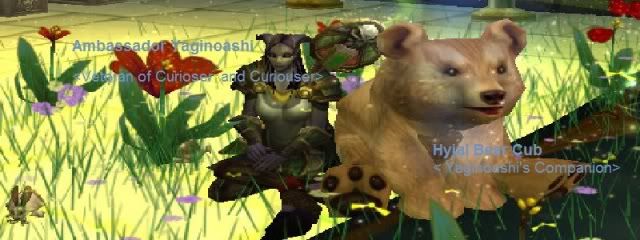
I've seen a lot of beautiful world of warcraft screenshots/profile picture in here. For example when you're a hunter, then you capture this picture where you like point with your bow and you've all your rare pets around you.
I was wondering how do you make those pictures? Do you guys have any experience or advices of any programs I could use? If, would you please leave a comment or give a link?
Thank you.
Ps. Im new here and I really cant figure out how to place this topic.
How do you make beautiful screenshots/profile pictures?
Forum rules
Be respectful of others or else. Read the details.
Be respectful of others or else. Read the details.

Re: How do you make beautiful screenshots/profile pictures?
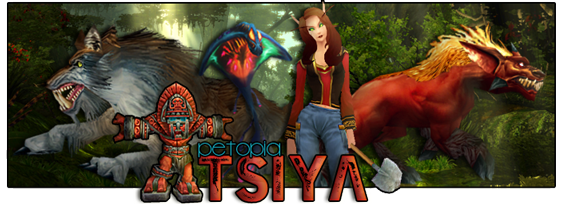
I think you mean signatures, there are people who make them in the avatar and signature thread. I believe they use WoW model viewer and something like paint or photoshop. It's a subforum of "fan art and creative writing".
-
Araela

- Artisan Hunter

- Posts: 938
- Joined: Wed Dec 08, 2010 7:44 am
- Realm: Thrall
- Gender: Female
- Location: Everett, WA
Re: How do you make beautiful screenshots/profile pictures?
I use wowmodelviewer and GIMP photo editor (both are free!)
-
Litlemouse

- Master Hunter

- Posts: 1158
- Joined: Mon Nov 29, 2010 11:59 am
- Realm: Vashj, Whisperwind
- Gender: No
- Location: Not-so-sunny California
Re: How do you make beautiful screenshots/profile pictures?
Well, I use Photoshop (haha got it today, yay!), and I believe there is a free demo if you want to try it out. It's complicated at first, the picture I have right now with King Krush in it? >.> it's my first one, I made it today, and it took me at least 2 hours just to get it all right. "ARRRGH how do you insert pictures together?!?!" 
Happily though, after you get the hang of it (which takes awhile :O ) it's awesome and really fun ^_^ plus it's easier, that too >.>
GIMP is nice too, I tried that yesterday, and they say it's pretty much as good as photoshop, but it's slightly different. I myself prefer photoshop over GIMP (silly me got mad at it ^.^;;), but maybe you could try both if you feel up to it
Also, fun facts about my siggy: if you look closely, you can see that my King Krush is missing a hand, and Litlemouse's feet are having a meltdown due to sloppy work and inexperiencedness
Happily though, after you get the hang of it (which takes awhile :O ) it's awesome and really fun ^_^ plus it's easier, that too >.>
GIMP is nice too, I tried that yesterday, and they say it's pretty much as good as photoshop, but it's slightly different. I myself prefer photoshop over GIMP (silly me got mad at it ^.^;;), but maybe you could try both if you feel up to it
Also, fun facts about my siggy: if you look closely, you can see that my King Krush is missing a hand, and Litlemouse's feet are having a meltdown
due to sloppy work and inexperiencedness 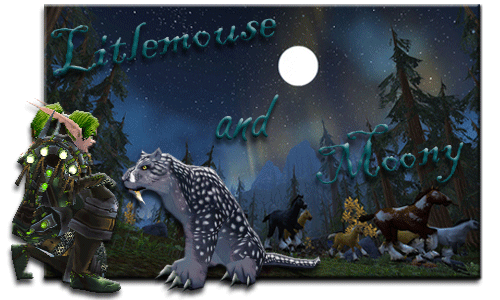
-
Chimera
- Illustrious Master Hunter

- Posts: 7584
- Joined: Wed Dec 15, 2010 12:19 am
- Realm: Nesingwary (H), Silver Hand (A), Moon Guard (A)
- Gender: Male
- Location: I have no idea
Re: How do you make beautiful screenshots/profile pictures?
I use WoWModelViwer and a free program thats called Paint.Net, its like GIMP but far easier to use imo, ive been using it for over a year now and i love it <3 GIMP has more in it though, its closer related to Photoshop while Paint.Net is more like Microsoft Paint with benefits (Paint.Net is a wonderful way of learning how to edit programs though, GIMP confused the hell outta me for a while and i already knew the basics of editing)
Frostmarrow by LupisDarkmoon
| Dragon Cave | Magistream | Flight Rising |
-
Litlemouse
- Master Hunter
- Posts: 1158
- Joined: Mon Nov 29, 2010 11:59 am
- Realm: Vashj, Whisperwind
- Gender: No
- Location: Not-so-sunny California
Re: How do you make beautiful screenshots/profile pictures?
>.> same hereXakaal wrote:...GIMP confused the hell outta me for a while...
Even photoshop I found easier
-
Vephriel

- Illustrious Master Hunter
- Posts: 16434
- Joined: Wed Jan 06, 2010 8:07 pm
- Realm: Wyrmrest Accord US
- Gender: Female
- Location: Canada
Re: How do you make beautiful screenshots/profile pictures?
I use Paint Shop Pro 7 for making graphics and signatures, an older program I've had for years now. It may be outdated, but I'm just familiar with it so it works well for me.

-
Chimera
- Illustrious Master Hunter
- Posts: 7584
- Joined: Wed Dec 15, 2010 12:19 am
- Realm: Nesingwary (H), Silver Hand (A), Moon Guard (A)
- Gender: Male
- Location: I have no idea
Re: How do you make beautiful screenshots/profile pictures?
Dont you need to buy that though? Or is there free versions on the internet? (ive come across too many that i think is free till it asks for product key or says its a free trial)
Frostmarrow by LupisDarkmoon
| Dragon Cave | Magistream | Flight Rising |
-
Litlemouse
- Master Hunter
- Posts: 1158
- Joined: Mon Nov 29, 2010 11:59 am
- Realm: Vashj, Whisperwind
- Gender: No
- Location: Not-so-sunny California
Re: How do you make beautiful screenshots/profile pictures?
Photoshop? Well I got a version with this thingy my friend gave me, Bamboo Tablet. I'm actually not sure if it's the full version or not
It basically gives you a special non-ink pen and you can draw on it with the pen or with your fingers and it draws it on the screen. Makes it like drawing on paper always reminds me of an iPad though...
Anyways here I am blahblahblah-ing again, sorry ^_^
It basically gives you a special non-ink pen and you can draw on it with the pen or with your fingers and it draws it on the screen. Makes it like drawing on paper
always reminds me of an iPad though...Anyways here I am blahblahblah-ing again, sorry ^_^
-
Chimera
- Illustrious Master Hunter
- Posts: 7584
- Joined: Wed Dec 15, 2010 12:19 am
- Realm: Nesingwary (H), Silver Hand (A), Moon Guard (A)
- Gender: Male
- Location: I have no idea
Re: How do you make beautiful screenshots/profile pictures?
Nono i was asking Veph but i didnt make a quote lol, i wish i had a tablet, tablets are eeeeeeeepic but far beyond my reach right now, specially cause my new computer pretty much costed me birthday and christmas gifts for this year and probably (doubt it'd be literally) next year
Frostmarrow by LupisDarkmoon
| Dragon Cave | Magistream | Flight Rising |
-
Nubhorns

- Master Hunter
- Posts: 1217
- Joined: Mon Jan 24, 2011 5:36 pm
- Realm: WrA
- Gender: Irrelevant
- Location: Internet
Re: How do you make beautiful screenshots/profile pictures?
GIMP is very user-unfriendly in the beginning. I used Photoshop(which does cost money) for years and when I moved over to GIMP(which is completely free) it did take me some time to reorient myself. However, there's a wealth of tutorials and videos all over the 'net about how to use the program, and a lot of them help quite a bit. :) Really it boils down to experimenting and practicing.
I don't really recommend dropping money on a tablet or anything just to make signatures though, even though I use one myself it's primarily for painting and drawing. If you do decide you want one, drop a few more bucks on a nicer one. My little Wacom is almost 7 years old now, the pen has been chewed on by my dog, and my sister regularly abducts it and leaves it places and it's still going strong.
Edit: It is worth adding, however, that most(if not all) graphic tablets come with a program of some sort. Not always the best program, but one all the same.
I don't really recommend dropping money on a tablet or anything just to make signatures though, even though I use one myself it's primarily for painting and drawing. If you do decide you want one, drop a few more bucks on a nicer one. My little Wacom is almost 7 years old now, the pen has been chewed on by my dog, and my sister regularly abducts it and leaves it places and it's still going strong.
Edit: It is worth adding, however, that most(if not all) graphic tablets come with a program of some sort. Not always the best program, but one all the same.
♥ || deviantART || armory || magistream || ♥
-
yaginoashi
- Posts: 45
- Joined: Tue May 03, 2011 12:54 pm
- Realm: Uldaman
- Gender: F
Re: How do you make beautiful screenshots/profile pictures?
I have a pic that I want to use as my signature but I cant figure out how to upload it. I tried the image button in the signature editor but that just made a link. Can anyone walk me through this?


Re: How do you make beautiful screenshots/profile pictures?
I use a wacom bamboo tablet which came with a free program: Corel Painter Essentials 4. So it's not quite as sophisticated, but it works enough for me.